Texmaker
Category of Texmaker:
Tags:
Open SourceWindows
Description:
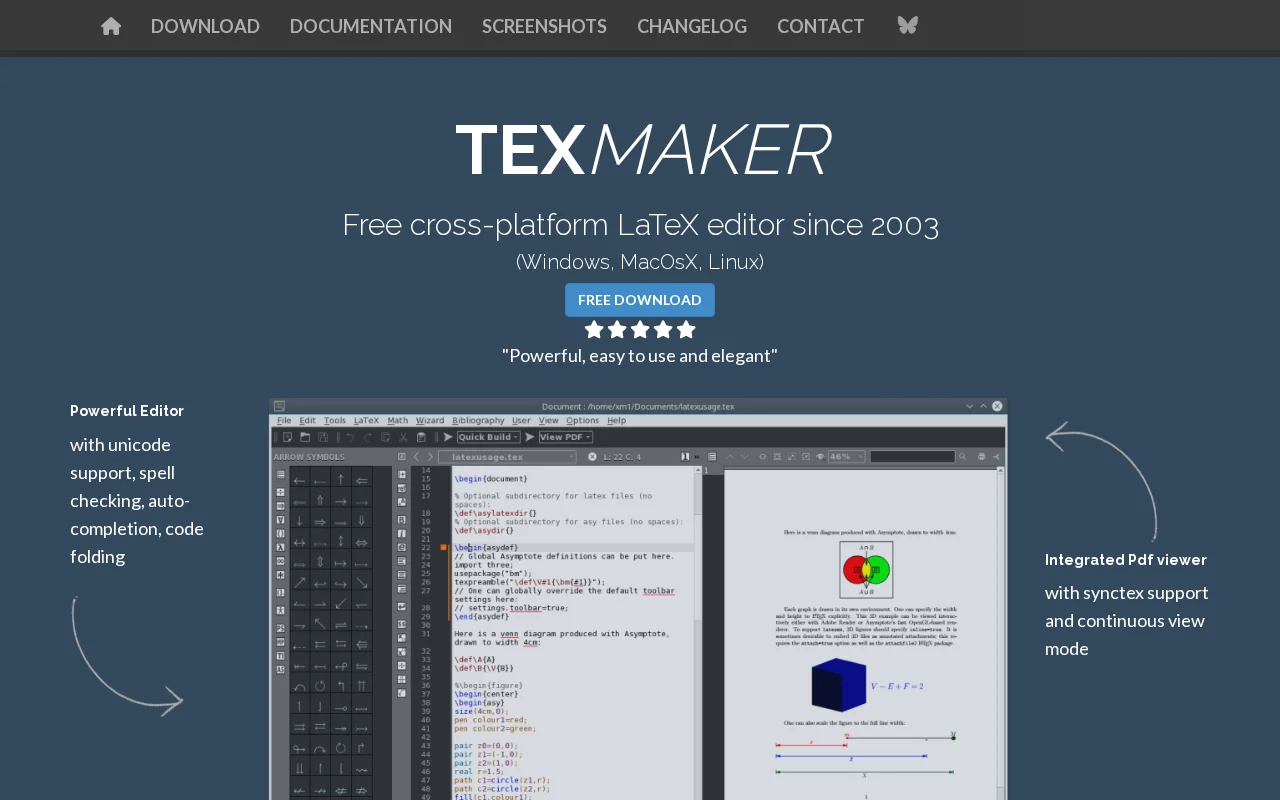
Texmaker is a free, cross-platform LaTeX editor for Linux, macOS, and Windows, offering a comprehensive suite of tools for efficient document development. It features Unicode support, spell checking, code completion, code folding, and an integrated PDF viewer with Synctex support. Wizards and quick build commands simplify LaTeX document creation for users of all levels.
Texmaker: A Comprehensive LaTeX Editing Solution
Texmaker is a powerful and free LaTeX editor available for Linux, macOS, and Windows. It offers an integrated environment with all the necessary tools for creating LaTeX documents efficiently. Users benefit from features like Unicode support, spell checking, code completion, and code folding, which significantly speed up the writing process. The application also includes a built-in PDF viewer that supports Synctex and continuous viewing, enhancing the workflow by allowing immediate preview of compiled documents.
How Texmaker Streamlines LaTeX Document Creation
Texmaker simplifies the LaTeX workflow by providing a unified platform for editing and compiling. Its intuitive interface and helpful features, such as wizards for generating document structures and a quick build command, make it accessible even for beginners. Advanced users will appreciate the master mode for managing multi-file projects, the structure view for easy navigation, and support for regular expressions in search and replace functions. The integrated PDF viewer with Synctex ensures seamless navigation between source code and the compiled document, making error correction and review straightforward.
Key Features and Capabilities of Texmaker
- Unicode Editor: Supports various encodings for broad compatibility.
- Spell Checker: Real-time checking as you type.
- Code Folding: Collapses sections like chapters and environments.
- Code Completion: Quickly inserts common LaTeX commands.
- Integrated PDF Viewer: Includes Synctex and continuous scrolling.
Best Use Cases for Texmaker
- Students writing theses and academic papers.
- Researchers preparing scientific publications.
- Anyone needing a free, reliable LaTeX editor.
- Users who prefer an integrated, all-in-one solution.
- Developers working on complex LaTeX projects.
How to Contact Texmaker Support
For support or inquiries regarding Texmaker, you can contact the developer via email at pbrachet@xm1math.net. The software is released under the GPL license.
Reviews0
Would you recommend Texmaker? Leave a comment
No reviews yet. Be the first to share your experience!
Alternatives
The best modern alternatives to Texmaker
Neovim
5.0
Last update: 1 days ago
Neovim is a modern, highly extensible fork of the Vim text editor, offering a powerful and user-friendly editing experience. It features a first-class API, built-in LSP client for code intelligence, and a client-server architecture for flexible session management. Neovim is fully compatible with Vim's editing model and Vimscript, making it an enhanced option for developers and power users seeking
View NeovimTags:Open SourceMIT LicenseFor Developers
View NeovimBrackets
5.0
Brackets is a free, open-source code editor for web development, featuring live preview and inline editors. It has evolved into Phoenix Code, offering enhanced cross-platform compatibility and features.
Open SourceFreeDesktop App
View Brackets
ProcessWire
5.0
ProcessWire is a free, open-source Content Management System (CMS) and framework (CMF) that prioritizes developer flexibility and user-friendliness. Built with a powerful and clean API, it allows for the creation of highly customized websites and applications with ease. Its custom field system provides granular control over content structure, while its scalable architecture ensures smooth performa
Open SourceMIT LicenseFor Developers
View ProcessWire
Geany
5.0
Geany is a powerful, stable, and lightweight programmer's text editor designed to enhance your workflow without causing slowdowns. It's a versatile tool that runs seamlessly on Linux, Windows, and macOS, and boasts translations in over 40 languages, making it accessible globally. With built-in support for more than 50 programming languages, Geany is ideal for developers of all levels seeking a fas
Open SourceGPLDesktop App
View Geany
Pulsar Edit
5.0
Pulsar Edit is a community-driven, open-source text editor that serves as a spiritual successor to the Atom editor. It offers a powerful and flexible environment for developers and writers alike, combining hackability with a user-friendly interface. Pulsar Edit runs seamlessly across macOS, Windows, and Linux, ensuring a consistent experience regardless of your operating system. Its built-in packa
Open SourceDesktop AppFor Developers
View Pulsar Edit
New Tools Releases
Recently added tools
Glyphr Studio
5.0
Glyphr Studio is a free, open-source, browser-based font editor designed for hobbyists and beginners. It allows users to import various font formats, utilize familiar vector editing tools, combine glyphs, and export custom typefaces directly from their browser, offering an accessible entry into font design without the need for complex professional software.
Open SourceWeb AppBrowser-Based
View Glyphr Studio
OpenPay
5.0
OpenPay is an advanced AI-powered platform designed specifically for subscription businesses to optimize revenue and enhance customer retention. It tackles common pain points such as high transaction fees by offering intelligent routing, robust payment recovery mechanisms, and actionable AI-driven insights, all consolidated into a single, user-friendly interface. This comprehensive solution aims t
View OpenPay
Tide
5.0
Tide is a nature-themed wellness application designed to help users find calm and focus amidst a busy life. It offers natural soundscapes paired with dedicated 'Focus' and 'Sleep' modules. By immersing users in peaceful, quiet environments, Tide aims to reduce anxiety and stress, improve concentration, and promote better sleep. The app is recognized for its minimalist design and effective tools fo
Trial AvailableMobile AppHealth
View Tide
Hitabs
5.0
Hitabs is an innovative online tool designed to streamline how users save, organize, and share their digital resources. Whether you're collecting articles to read later, bookmarking valuable websites, or curating links for a project, Hitabs offers a centralized and intuitive platform. It caters to students, researchers, professionals, and anyone looking to manage their online information more effe
Browser-BasedWeb AppLightweight
View Hitabs
Apache Subversion
5.0
Apache Subversion (SVN) is a robust, open-source, centralized version control system designed for managing code and project data. It offers reliability, simplicity, and scalability, making it suitable for individual developers and large enterprise operations. Subversion excels at tracking changes, facilitating collaboration, and ensuring data integrity. Its widespread adoption in both open-source
Open SourceGPLFor Developers
View Apache Subversion
Spamgourmet
5.0
Spamgourmet provides free, auto-creating email addresses that forward messages to your primary inbox and then expire, acting as a powerful spam blocker. It's ideal for anyone who wants to protect their main email from spam when signing up for new services or giving out contact information. The tool requires no installation and is designed for minimal user intervention after initial setup, making i
FreeWeb AppPrivacy-Focused
View Spamgourmet
Crew
5.0
Crew is a high-yield checking account that actively manages your finances through automated 'pockets,' paycheck splitting, and bill management. It offers a subscription-free approach to personal finance, empowering users with control and clarity over their money, alongside features like parental controls and competitive APY on deposits. Banking services are provided by Bangor Savings Bank, Member
Trial AvailableSubscription-BasedMobile App
View Crew
Ludwig
5.0
Ludwig is an open-source declarative deep learning framework that simplifies building, fine-tuning, and deploying ML models using a YAML file. It supports various data modalities and scales seamlessly from a laptop to distributed clusters, offering the flexibility of PyTorch with the ease of AutoML.
Open SourceFor DevelopersAutomation
View Ludwig