DB Browser for SQLite
Category of DB Browser for SQLite:
Tags:
Open SourceDesktop AppWindows
Description:
DB Browser for SQLite (DB4S) is a powerful, open-source, visual tool designed for creating, searching, and editing SQLite and SQLCipher database files. It offers a user-friendly, spreadsheet-like interface alongside a full SQL query facility, making database management accessible to both beginners and experienced users. DB4S supports Windows, macOS, Linux, and Unix, providing a comprehensive solut
DB Browser for SQLite: Comprehensive SQLite Database Management
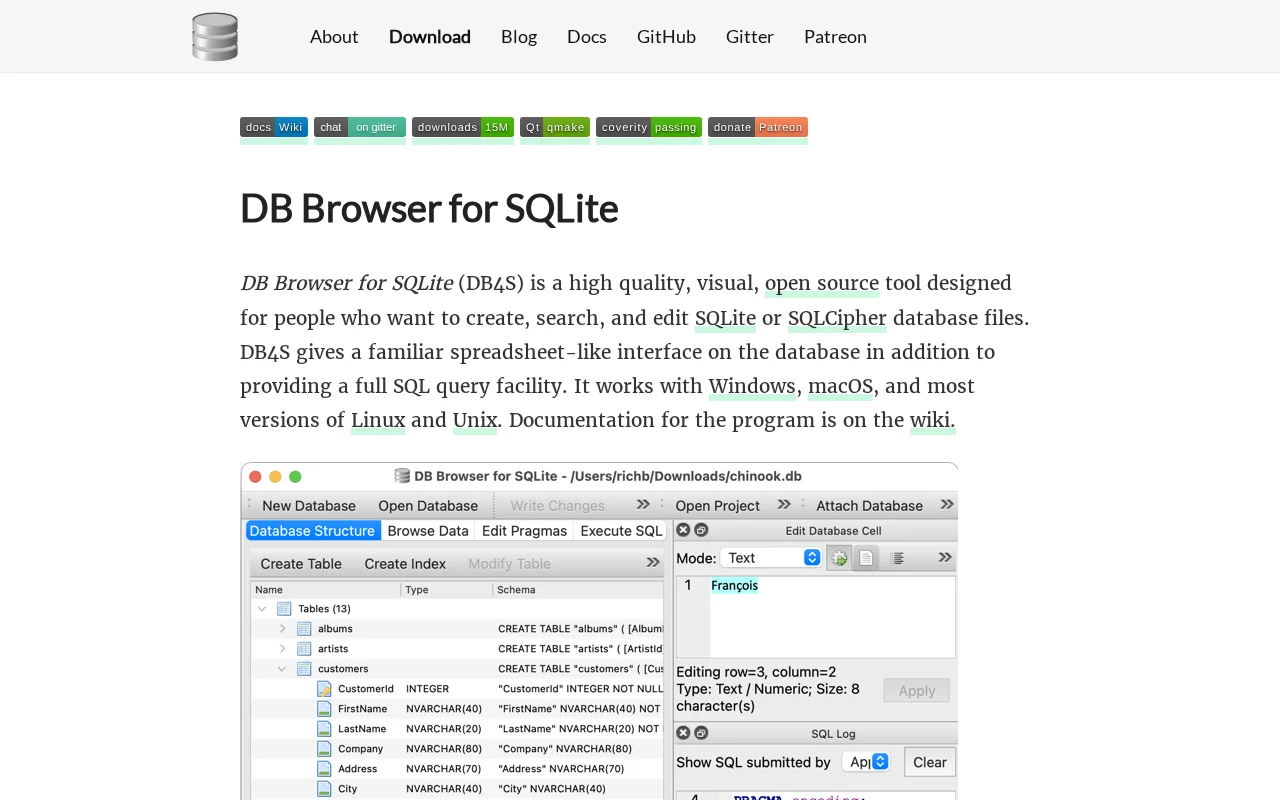
DB Browser for SQLite (DB4S) is a high-quality, open-source, visual tool meticulously crafted for users who need to create, search, and edit SQLite or SQLCipher database files. It bridges the gap between complex command-line interfaces and user-friendly graphical tools, offering a familiar spreadsheet-like interface for data browsing and editing, complemented by a robust SQL query engine. This cross-platform application is available for Windows, macOS, Linux, and Unix systems, ensuring accessibility for a wide range of users and environments. DB4S empowers users with full access to the underlying SQLite database capabilities, providing an integrated solution for all their database management needs.
The tool is designed to simplify database operations, allowing users to perform a multitude of tasks without requiring deep technical expertise. From creating and structuring database files and tables to importing/exporting data and executing complex SQL queries, DB4S streamlines the entire database lifecycle. Its intuitive design and comprehensive feature set make it an indispensable tool for developers, data analysts, and anyone working with SQLite databases, ensuring efficient and effective database management.
Getting Started with DB Browser for SQLite
Getting started with DB Browser for SQLite is straightforward. Users can begin by creating a new database file or opening an existing one. The main interface presents tables and data in a grid format, similar to a spreadsheet, allowing for direct browsing and editing of records. For more advanced operations, users can switch to the SQL execution tab to write and run custom SQL queries, with results displayed clearly. The tool also provides wizards and controls for creating and modifying tables, indexes, and managing data import/export operations, facilitating a seamless workflow from basic data viewing to complex database administration.
DB4S also offers features for managing database structure, such as creating, defining, and deleting tables and indexes. Data can be imported from or exported to various formats, including CSV and SQL dumps. Furthermore, it supports adding or removing SQLCipher encryption from database files, enhancing data security. The integrated log of SQL commands issued by the application aids in understanding and debugging operations.
Key Features of DB Browser for SQLite
- Database Creation & Compaction: Create new database files or optimize existing ones.
- Table Management: Define, modify, and delete tables and their structures.
- Data Browsing & Editing: View, edit, add, and delete records with ease.
- SQL Query Facility: Execute SQL commands and inspect query results directly.
- Data Import/Export: Import/export data in formats like CSV and SQL dumps.
Ideal Use Cases for DB Browser for SQLite
- Developers building applications that use SQLite databases.
- Data analysts needing to inspect, query, and manipulate SQLite data.
- Students learning about database management and SQL.
- Users requiring a visual interface for SQLite or SQLCipher databases.
- Anyone needing to create, edit, or manage SQLite database files on Windows, macOS, or Linux.
DB Browser for SQLite Support and Resources
For support, documentation, and community assistance, please refer to the official wiki available on GitHub. You can also join the Gitter chat for real-time discussions with the community and developers. For bug reports or feature requests, the GitHub repository is the primary channel.
Reviews0
Would you recommend DB Browser for SQLite? Leave a comment
No reviews yet. Be the first to share your experience!
Alternatives
The best modern alternatives to DB Browser for SQLite
Coder
5.0
Last update: 5 days ago
Coder is an open-source, self-hosted remote development environment designed to accelerate software delivery. It provides developers with secure, consistent development workspaces, whether they are working from the cloud or on-premise. Coder enhances developer productivity by offering a unified and reliable environment, reducing setup time and eliminating inconsistencies across different machines.
View CoderTags:Open SourceFor DevelopersDev Tools
View CoderB4A
5.0
B4A (Basic for Android) is a free, powerful, and user-friendly Integrated Development Environment (IDE) for rapid native Android application development. It's trusted by tens of thousands of developers worldwide and integrates seamlessly with B4i for cross-platform development. B4A offers a comprehensive feature set suitable for any Android app project, making it an accessible and robust solution
Open SourceFreeAndroid
View B4A
MIRC
5.0
mIRC is a feature-rich Internet Relay Chat (IRC) client that has been a staple in online communication for over three decades. It allows individuals and organizations to connect to IRC networks worldwide for real-time chat, file sharing, and collaborative activities. Renowned for its reliability and extensive customization options, mIRC offers a powerful yet user-friendly interface for engaging in
WindowsChatChat
View MIRC
Letos
5.0
Letos is a powerful and intuitive graphical user interface (GUI) tool designed for creating, editing, and browsing SQLite databases. It offers a comprehensive set of features for both novice and experienced users, enabling seamless database management directly from your desktop. With its user-friendly design, Letos makes complex database operations accessible, allowing you to efficiently work with
Open SourceGPLDesktop App
View Letos
Flarum
5.0
Flarum is a modern, open-source forum software designed to be beautiful, fast, and extensible. It provides a robust platform for building vibrant online communities, from small groups to large-scale discussions. With its user-friendly interface and powerful customization options, Flarum offers a seamless experience for both administrators and members. Its core philosophy centers around simplicity
Open SourceMIT LicenseFree
View Flarum
New Tools Releases
Recently added tools
Quiver
5.0
Quiver is a modern, user-friendly editor designed for creating commutative diagrams. It offers robust support for the popular tikz-cd package, making it an ideal tool for mathematicians, researchers, and students who need to visualize complex relationships and structures. The intuitive interface allows for efficient diagram construction, enabling users to focus on their mathematical content rather
Open SourceWeb AppWeb
View Quiver
Retro Game Trivia
5.0
Retro Game Trivia is a free, daily browser game for retro video game enthusiasts. Players guess classic video games using various methods, including letter reveals, textual clues, iconic screenshots, and box art. This engaging Wordle-style game provides a fun way to test and expand your knowledge of gaming history. With multiple game modes and an archive of past challenges, it caters to both casua
Browser-BasedFreeEarly Access
View Retro Game Trivia
Iron Marines
5.0
Iron Marines is a real-time strategy game blending action and tower defense. Players command heroes and units across a sci-fi universe to battle alien invaders. Available on mobile (iOS, Android) and PC (Steam), it offers engaging campaigns and tactical gameplay.
Gaming ToolsFor CreatorsMobile App
View Iron Marines
BiblioReads
5.0
BiblioReads is a free and open-source front-end for Goodreads, prioritizing user privacy. It allows users to search for book information directly from the Goodreads database without the privacy concerns associated with the official platform. Ideal for readers who want a clean, private way to track their reading, manage lists, and discover book details.
Open SourceFreePrivacy-Focused
View BiblioReads
IVentoy
5.0
iVentoy is a powerful and user-friendly network boot solution that transforms any computer into a PXE/HTTPBoot server. It allows for simultaneous operating system installation and booting across multiple machines without complex configuration. Supporting a wide range of operating systems and UEFI modes, including Secure Boot, iVentoy is ideal for IT professionals, system administrators, and anyone
Open SourceWindowsLinux
View IVentoy
PocketBase
5.0
PocketBase is an open-source backend solution that simplifies application development by bundling a real-time database, authentication services, file storage, and an integrated admin dashboard into a single, self-contained file. This all-in-one approach is ideal for developers seeking a lightweight yet powerful backend for rapid prototyping, small to medium-sized applications, and projects where m
Open SourceLinuxDev Tools
View PocketBase
OpenRCT2
5.0
OpenRCT2 is a community-driven, open-source re-implementation of RollerCoaster Tycoon 2, enhancing the classic game with bug fixes, improved performance, and new features. It offers modern gameplay enhancements, extensive customization, and robust multiplayer support, making it ideal for fans seeking a more stable and feature-rich theme park simulation experience. This free project is actively dev
Open SourcemacOSLinux
View OpenRCT2
MagicHow
5.0
MagicHow is an AI-powered SaaS platform that automates the creation of step-by-step guides, SOPs, and training manuals. It captures processes visually and uses AI to refine content, making documentation creation efficient and accessible for teams aiming to standardize operations and knowledge management.
View MagicHow