NotesNook
Category of NotesNook:
Tags:
Open SourceFreePrivacy-Focused
Description:
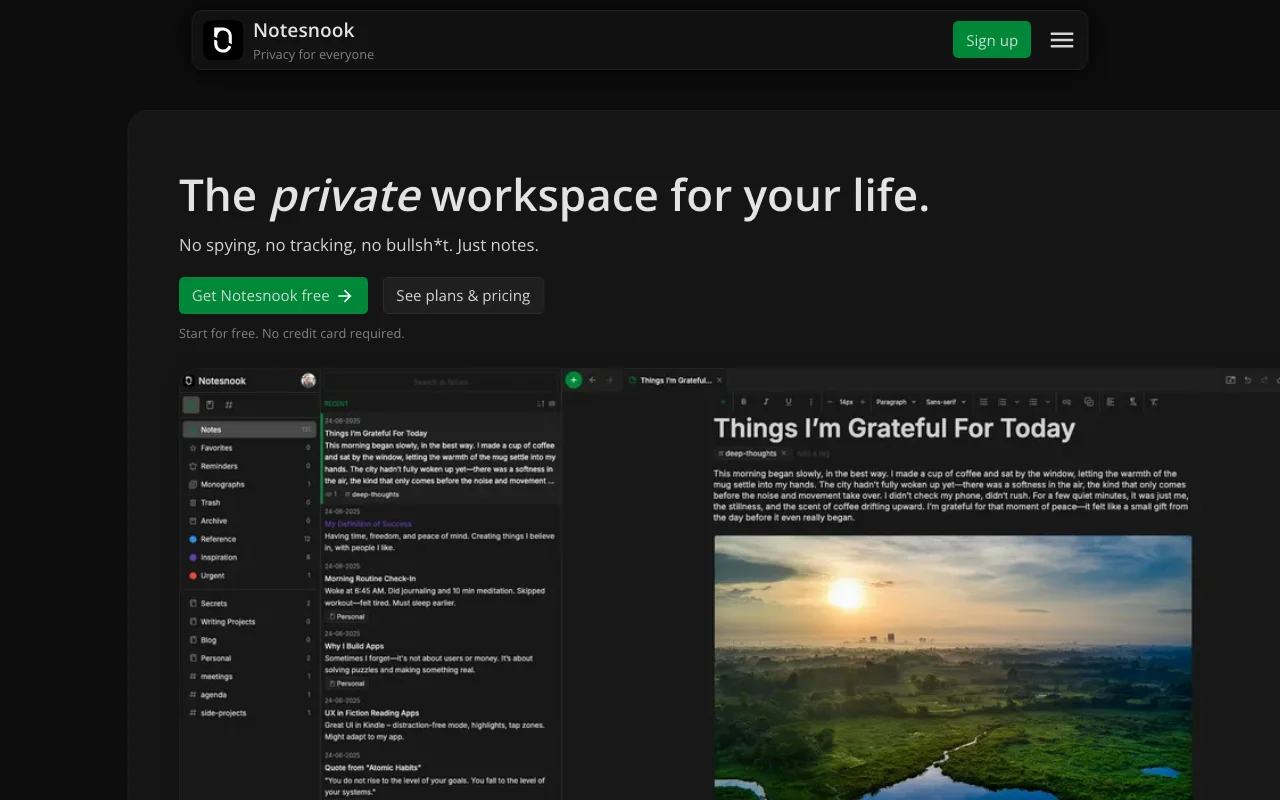
NotesNook is a free, open-source, and privacy-focused note-taking application that runs locally on your device. It offers robust end-to-end encryption, cross-platform availability (desktop and web), and seamless device synchronization. Its intuitive interface supports Markdown for efficient writing.
Discover NotesNook: Your Secure, Private Note-Taking Solution
NotesNook is a free, open-source, and privacy-focused note-taking app designed for local device use. It ensures your data remains secure and accessible with robust end-to-end encryption. Enjoy seamless cross-platform availability and synchronization across your devices.
Key Features of NotesNook for Enhanced Productivity
- End-to-end Encryption: Guarantees your notes are private and secure.
- Markdown Support: Write and format notes efficiently using Markdown.
- Cross-Platform Availability: Access NotesNook on desktop (Windows, macOS, Linux) and web.
- Device Synchronization: Keep your notes updated across all your devices securely.
- Open Source Transparency: Benefit from community-driven development and transparency.
Getting Started with NotesNook: Simple Setup
Download NotesNook for your desktop or access the web version. Begin creating notes, organizing them with notebooks and tags, and utilize its powerful search. Follow the straightforward setup for secure device synchronization.
Who Benefits from NotesNook's Privacy-First Approach
- Privacy-conscious individuals seeking secure note storage.
- Students and professionals organizing research and project ideas.
- Users preferring free, open-source alternatives to proprietary apps.
- Anyone needing a reliable, cross-platform note-taking solution.
NotesNook Support and Community Resources
As an open-source project, NotesNook relies on community support. Find resources and assistance via the official GitHub repository. Detailed documentation is also available.
Reviews0
Would you recommend NotesNook? Leave a comment
No reviews yet. Be the first to share your experience!
Alternatives
The best modern alternatives to NotesNook
Joplin
5.0
Last update: 6 days ago
Joplin is a powerful open-source note-taking application designed to securely capture and organize your thoughts across all your devices. It supports rich multimedia content, including images, videos, and audio files, allowing for comprehensive note-taking. With features like web clipping and end-to-end encryption, Joplin ensures your data remains private and accessible wherever you go.
View JoplinTags:Open SourceFreePrivacy-Focused
View JoplinHivenet
5.0
Hivenet offers a distributed infrastructure for AI inference, compute, and storage, providing on-demand GPU/CPU rental, an inference API, and scalable storage solutions. It emphasizes transparent pricing, benchmarked performance, and data sovereignty, making it suitable for AI workloads, HPC, and secure data management.
Open SourcePaidFor Developers
View Hivenet
YunoHost
5.0
YunoHost simplifies self-hosting of digital services for individuals and small organizations. This open-source system allows easy installation and management of applications like websites, email servers, and wikis, ensuring users retain full control over their data and privacy. It promotes digital autonomy and a decentralized internet.
Open SourcePrivacy-FocusedMIT License
View YunoHost
Snipe-IT
5.0
Snipe-IT is a free, open-source IT asset management system designed to replace cumbersome spreadsheets. It offers a user-friendly interface for tracking hardware, software licenses, accessories, and more, making asset management efficient and enjoyable for teams. With built-in security features like bcrypt, 2FA, and HTTPS-only cookies, it prioritizes data protection. Snipe-IT also provides a robus
Open SourceFreeFor Marketers
View Snipe-IT
Koofr
5.0
Koofr offers secure, private European cloud storage with a focus on user privacy and GDPR compliance. It allows users to consolidate multiple cloud accounts into a single interface, providing seamless access across devices. Features include encryption, secure file sharing, and online collaboration.
Privacy-FocusedSecurity
View Koofr
New Tools Releases
Recently added tools
Quiver
5.0
Quiver is a modern, user-friendly editor designed for creating commutative diagrams. It offers robust support for the popular tikz-cd package, making it an ideal tool for mathematicians, researchers, and students who need to visualize complex relationships and structures. The intuitive interface allows for efficient diagram construction, enabling users to focus on their mathematical content rather
Open SourceWeb AppWeb
View Quiver
Retro Game Trivia
5.0
Retro Game Trivia is a free, daily browser game for retro video game enthusiasts. Players guess classic video games using various methods, including letter reveals, textual clues, iconic screenshots, and box art. This engaging Wordle-style game provides a fun way to test and expand your knowledge of gaming history. With multiple game modes and an archive of past challenges, it caters to both casua
Browser-BasedFreeEarly Access
View Retro Game Trivia
Iron Marines
5.0
Iron Marines is a real-time strategy game blending action and tower defense. Players command heroes and units across a sci-fi universe to battle alien invaders. Available on mobile (iOS, Android) and PC (Steam), it offers engaging campaigns and tactical gameplay.
Gaming ToolsFor CreatorsMobile App
View Iron Marines
BiblioReads
5.0
BiblioReads is a free and open-source front-end for Goodreads, prioritizing user privacy. It allows users to search for book information directly from the Goodreads database without the privacy concerns associated with the official platform. Ideal for readers who want a clean, private way to track their reading, manage lists, and discover book details.
Open SourceFreePrivacy-Focused
View BiblioReads
IVentoy
5.0
iVentoy is a powerful and user-friendly network boot solution that transforms any computer into a PXE/HTTPBoot server. It allows for simultaneous operating system installation and booting across multiple machines without complex configuration. Supporting a wide range of operating systems and UEFI modes, including Secure Boot, iVentoy is ideal for IT professionals, system administrators, and anyone
Open SourceWindowsLinux
View IVentoy
PocketBase
5.0
PocketBase is an open-source backend solution that simplifies application development by bundling a real-time database, authentication services, file storage, and an integrated admin dashboard into a single, self-contained file. This all-in-one approach is ideal for developers seeking a lightweight yet powerful backend for rapid prototyping, small to medium-sized applications, and projects where m
Open SourceLinuxDev Tools
View PocketBase
OpenRCT2
5.0
OpenRCT2 is a community-driven, open-source re-implementation of RollerCoaster Tycoon 2, enhancing the classic game with bug fixes, improved performance, and new features. It offers modern gameplay enhancements, extensive customization, and robust multiplayer support, making it ideal for fans seeking a more stable and feature-rich theme park simulation experience. This free project is actively dev
Open SourcemacOSLinux
View OpenRCT2
MagicHow
5.0
MagicHow is an AI-powered SaaS platform that automates the creation of step-by-step guides, SOPs, and training manuals. It captures processes visually and uses AI to refine content, making documentation creation efficient and accessible for teams aiming to standardize operations and knowledge management.
View MagicHow