
Fork
Category of Fork:
Tags:
macOSFor Developers
Description:
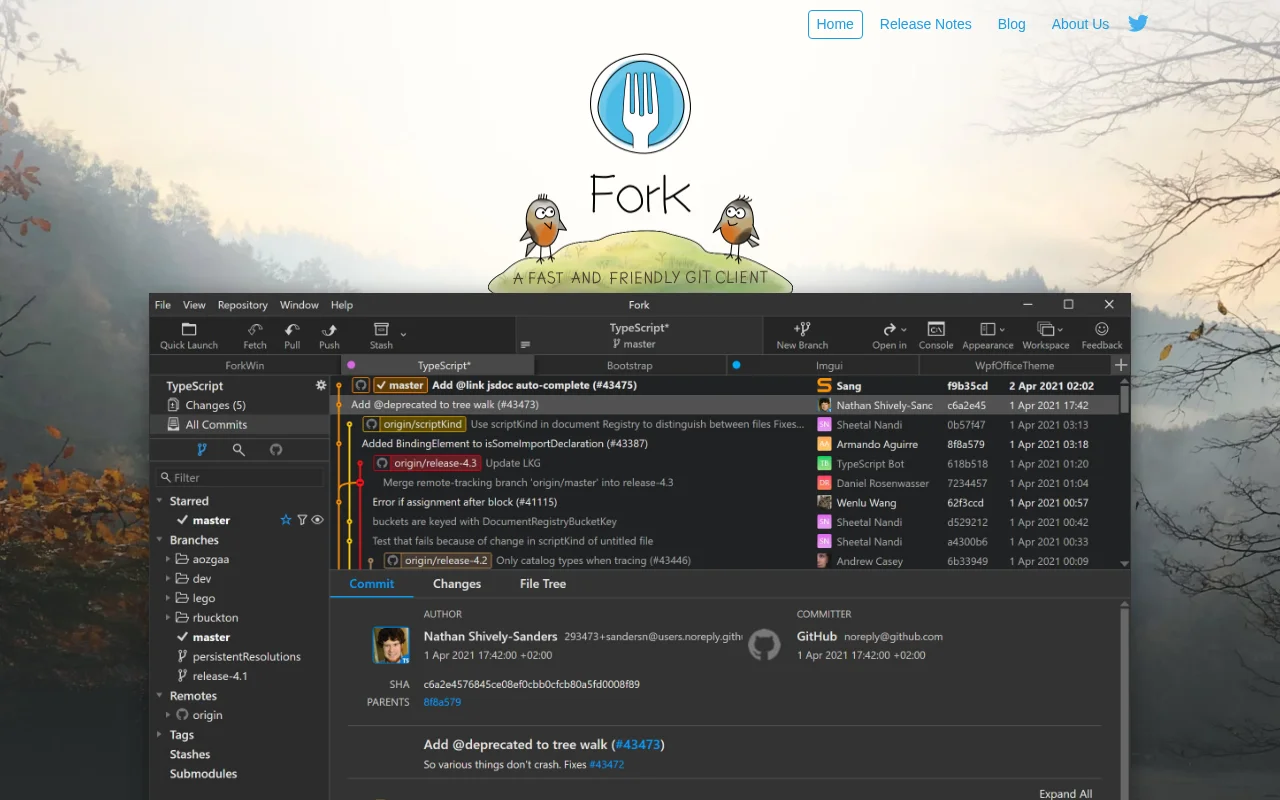
Fork is a fast and friendly Git client for Mac and Windows, offering a seamless experience for managing code repositories. It provides a powerful diff viewer, intuitive merge conflict resolution, and visual interactive rebase tools, making complex Git operations more accessible and enhancing developer productivity.
Fork: A Powerful Git Client for Mac and Windows
Fork is a sophisticated yet user-friendly Git client meticulously crafted for macOS and Windows. It aims to simplify and enhance the Git workflow for developers of all levels. By offering a visually intuitive interface, Fork makes common and advanced Git operations more manageable, from basic commits and branching to complex tasks like resolving merge conflicts and performing interactive rebases.
The application distinguishes itself with a clean design and a focus on performance, ensuring a smooth experience even with large repositories. It integrates essential Git functionalities, providing tools that help developers understand their repository's history, track changes, and manage their projects more effectively.
Key Features of the Fork Git Client
- Intuitive Interface: Clean and user-friendly design for effortless Git management.
- Visual Interactive Rebase: Easily edit, reorder, and squash commits.
- Merge Conflict Resolution: Built-in tools for seamless conflict management.
- Side-by-Side Diffs: Clearly visualize changes between file versions.
- Repository Manager: Summary and statistics for a comprehensive overview.
Streamline Your Development Workflow with Fork
Getting started with Fork is straightforward. Upon launching, you can easily clone existing repositories from platforms like GitHub, GitLab, or Bitbucket, or open local ones. The main interface presents your working directory changes and commit history clearly. When you need to resolve merge conflicts, Fork offers built-in tools to help you navigate and fix them efficiently. For advanced tasks, the interactive rebase feature allows you to visually reorder, squash, or edit commits, providing fine-grained control over your commit history before sharing it.
Ideal Use Cases for Fork Git Client
- Software development workflows
- Managing large or complex Git repositories
- Teams needing a consistent Git client
- Developers preferring a visual Git interface
- Streamlining code reviews and history management
- Individual developers seeking efficiency
Contact Fork Support
For any support inquiries or assistance with Fork, you can reach out to the development team via email at support@fork.dev. They are dedicated to helping users with their Git-related needs and ensuring a positive experience with the application.
Reviews0
Would you recommend Fork? Leave a comment
No reviews yet. Be the first to share your experience!
Alternatives
The best modern alternatives to Fork
Araxis Merge
5.0
Last update: 4 days ago
Araxis Merge is a powerful file comparison and merging tool designed for professionals. It offers advanced 2-way and 3-way comparison capabilities for tracking and reconciling changes in source code, documents, and other text-based files. The tool seamlessly merges revisions, synchronizes entire folder trees, and supports various file formats, including Office documents and PDFs, with direct integ
View Araxis MergeTags:WindowsmacOSDev Tools
View Araxis MergeApache Subversion
5.0
Apache Subversion (SVN) is a robust, open-source, centralized version control system designed for managing code and project data. It offers reliability, simplicity, and scalability, making it suitable for individual developers and large enterprise operations. Subversion excels at tracking changes, facilitating collaboration, and ensuring data integrity. Its widespread adoption in both open-source
Open SourceGPLFor Developers
View Apache Subversion
Pulsar Edit
5.0
Pulsar Edit is a community-driven, open-source text editor that serves as a spiritual successor to the Atom editor. It offers a powerful and flexible environment for developers and writers alike, combining hackability with a user-friendly interface. Pulsar Edit runs seamlessly across macOS, Windows, and Linux, ensuring a consistent experience regardless of your operating system. Its built-in packa
Open SourceDesktop AppFor Developers
View Pulsar Edit
Hg.sr.ht
5.0
hg.sr.ht is a Mercurial repository hosting service integrated with the sourcehut platform. It provides a secure environment for developers to manage code, offering support for public, private, and unlisted repositories with fine-grained access control and integrated software release management.
Open SourceFor DevelopersDev Tools
View Hg.sr.ht
RhodeCode
5.0
RhodeCode is a unified platform for source code management, code review, and security scanning. It supports Git, Mercurial, and Subversion, offering a centralized solution for development teams to automate workflows, enhance collaboration, and proactively identify vulnerabilities.
ProprietaryFor Developers
View RhodeCode
New Tools Releases
Recently added tools
Hitabs
5.0
Hitabs is an innovative online tool designed to streamline how users save, organize, and share their digital resources. Whether you're collecting articles to read later, bookmarking valuable websites, or curating links for a project, Hitabs offers a centralized and intuitive platform. It caters to students, researchers, professionals, and anyone looking to manage their online information more effe
Browser-BasedWeb AppLightweight
View Hitabs
Apache Subversion
5.0
Apache Subversion (SVN) is a robust, open-source, centralized version control system designed for managing code and project data. It offers reliability, simplicity, and scalability, making it suitable for individual developers and large enterprise operations. Subversion excels at tracking changes, facilitating collaboration, and ensuring data integrity. Its widespread adoption in both open-source
Open SourceGPLFor Developers
View Apache Subversion
Spamgourmet
5.0
Spamgourmet provides free, auto-creating email addresses that forward messages to your primary inbox and then expire, acting as a powerful spam blocker. It's ideal for anyone who wants to protect their main email from spam when signing up for new services or giving out contact information. The tool requires no installation and is designed for minimal user intervention after initial setup, making i
FreeWeb AppPrivacy-Focused
View Spamgourmet
Crew
5.0
Crew is a high-yield checking account that actively manages your finances through automated 'pockets,' paycheck splitting, and bill management. It offers a subscription-free approach to personal finance, empowering users with control and clarity over their money, alongside features like parental controls and competitive APY on deposits. Banking services are provided by Bangor Savings Bank, Member
Trial AvailableSubscription-BasedMobile App
View Crew
Ludwig
5.0
Ludwig is an open-source declarative deep learning framework that simplifies building, fine-tuning, and deploying ML models using a YAML file. It supports various data modalities and scales seamlessly from a laptop to distributed clusters, offering the flexibility of PyTorch with the ease of AutoML.
Open SourceFor DevelopersAutomation
View Ludwig
Reeder
5.0
Reeder is a modern news reader that unifies RSS feeds, videos, podcasts, and social media into a single timeline. It features seamless cross-device syncing via iCloud, powerful custom filters, and a simple way to save links. Reeder prioritizes a clean interface and user privacy, making it an efficient tool for content consumption.
Desktop AppMobile AppmacOS
View Reeder
SurveyJS
5.0
SurveyJS is a powerful JavaScript library that enables developers to build custom survey and form management systems directly within their applications. It offers unparalleled flexibility through JSON-based configuration, ensuring users retain full ownership of their data and can handle an unlimited number of responses. The latest version, v3.0, introduces significant enhancements like a shared st
Open SourceFor Developers
View SurveyJS
Small Basic
5.0
Small Basic is a free, beginner-friendly programming language developed by Microsoft, designed to make coding accessible and fun for learners of all ages. It simplifies complex programming concepts with an easy-to-understand syntax and a built-in Integrated Development Environment (IDE) that includes helpful features like syntax highlighting and debugging tools. This educational tool empowers user
Open SourceFor StudentsFor Teachers
View Small Basic